The full implementation is open-source:
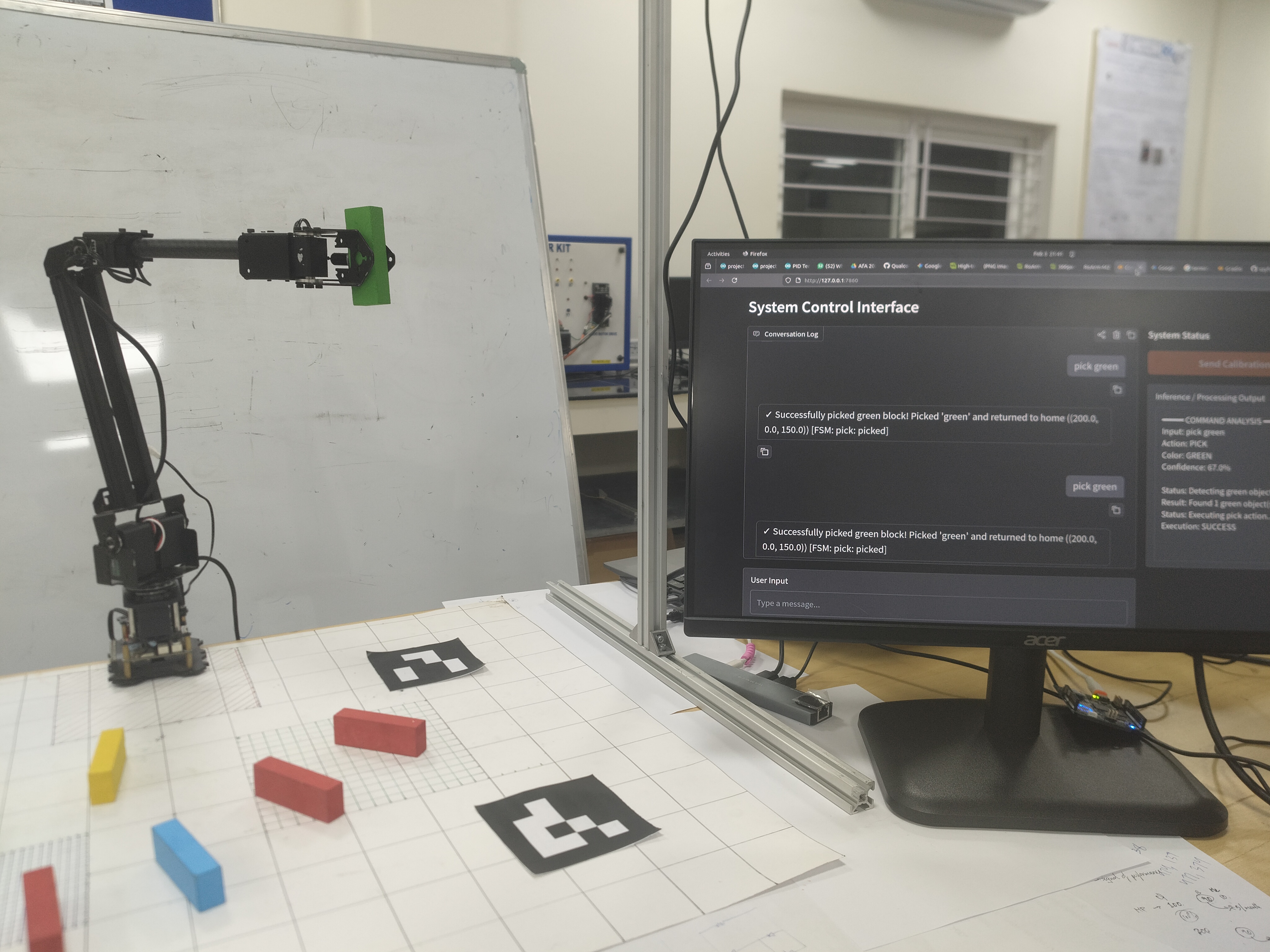
The TL;DR
Most robotic manipulation systems assume the operator knows joint-space kinematics, coordinate transforms, and pendant programming. The goal was the opposite: walk up, say "pick up the red block," and watch the arm do it.
The Semantic Manipulator bridges conversational intent and physical manipulation by fusing three things: a monocular vision pipeline that localizes colored blocks in the robot's coordinate frame, a lightweight text classifier that parses free-form commands into deterministic action primitives, and a finite state machine that grounds every action against physical reality before the motors move.
I built this system with two teammates, and it runs in real-time on a single machine, uses no cloud APIs for inference, and the arm hasn't dropped a block it wasn't supposed to yet.
Why This Matters
Programming a robotic arm to pick up a specific object in an unstructured scene typically requires solving three problems simultaneously:
- Perception -- Where is the object, and which one is it?
- Semantic understanding -- What does the user actually want?
- Safe execution -- Is the requested action physically valid right now?
Industrial solutions tend to hardcode the first, ignore the second, and gate the third behind interlocks. Research demos often showcase impressive language-conditioned policies but require GPU clusters, large-scale training data, or sim-to-real transfer.
We wanted something in between: a system that genuinely understands free-form language, runs locally, and cannot hallucinate its way into unsafe motor commands. The key design constraint was that natural language should inform the action, but never directly control the actuators.
System Architecture
The pipeline follows a strict Sense-Think-Act loop. Each node is independently testable, and the interfaces between them are plain Python dictionaries.
| Stage | Module | Responsibility |
|---|---|---|
| Sense | detect_jenga.py, colour_coordinates.py |
HSV segmentation, pinhole projection, homography transform |
| Think | text_classifier.py, fsm_controller.py |
Intent classification, state validation |
| Act | roarm_m2/actions/ |
Cartesian motion sequences via JSON-over-HTTP |
| Interface | homepage.py |
Gradio chat console, teleop controls |
Vision Pipeline: From Pixels to Robot Coordinates
The perception system has one job: produce a dictionary mapping color names to 3D coordinates in the robot's base frame. Everything downstream consumes this dictionary.
# Output format of the vision pipeline
{
    "red":    [(x1, y1, z1), (x2, y2, z2)],
    "blue":   [(x3, y3, z3)],
    "green":  [(x4, y4, z4), (x5, y5, z5), (x6, y6, z6)]
}
Color Segmentation
Blocks are segmented in HSV space using hand-tuned ranges for six colors. The ranges were chosen to be tight enough to avoid cross-talk (particularly the red-orange-yellow boundary), while still being robust under the overhead lighting.
| Color | Hue Range(s) | Notes |
|---|---|---|
| Red | [0, 5] and [160, 180] | Wraps around the hue cylinder |
| Orange | [6, 20] | Narrow band between red and yellow |
| Yellow | [21, 35] | Starts at 21 to avoid orange bleed |
| Green | [40, 80] | Widest range; most stable |
| Blue | [70, 130] | Overlaps slightly with green at boundary |
| Pink | [140, 165] | High-value, low-saturation distinguishes from red |
After thresholding, a morphological close-then-open (5x5 kernel) is applied to fill small holes and remove speckle noise. Contours below 500 px area or with solidity < 0.6 are rejected.
Handling Merged Contours
Here's a problem that textbooks skip: when two same-colored blocks touch, OpenCV returns a single merged contour. Since Jenga blocks have known physical dimensions (7.0 x 2.5 x 1.5 cm), oversized contours are detected and split.
The idea is simple. For a single block, the observed aspect ratio should match:
\[ r_{\text{expected}} = \frac{L_{\text{long}}}{L_{\text{short}}} = \frac{7.0}{2.5} = 2.8 \]
If the observed ratio significantly exceeds this (beyond a 30% tolerance), I infer multiple blocks along the major axis and subdivide accordingly:
\[ n_{\text{major}} = \text{round}\left(\frac{r_{\text{observed}}}{r_{\text{expected}}}\right) \]
The subdivided rectangles inherit the parent's orientation and are spaced uniformly along the major axis. This handles the common case of two or three blocks lined up end-to-end.
Monocular Depth via Pinhole Model
The Intel RealSense D435 provides calibrated intrinsics, but the depth stream is not used. Instead, since the block dimensions are known, distance is estimated from the camera using the classic pinhole relation:
\[ D = \frac{L_{\text{real}} \cdot f_x}{L_{\text{pixel}}} \]
where \(L_{\text{real}} = 7.0\) cm (longest block side), \(f_x\) is the focal length in pixels, and \(L_{\text{pixel}}\) is the detected longest side in pixels.
Once depth \(D\) is obtained for a block at pixel \((u, v)\), back-projection to camera-frame 3D coordinates is straightforward:
\[ X = \frac{(u - c_x) \cdot D}{f_x}, \quad Y = \frac{(v - c_y) \cdot D}{f_y}, \quad Z = D \]
Why not use the depth stream? The D435's stereo depth is noisy at short range (< 30 cm) and struggles with small, textureless objects like colored blocks. The monocular approach with known object dimensions turned out to be more reliable for our setup.
Camera-to-Robot Calibration
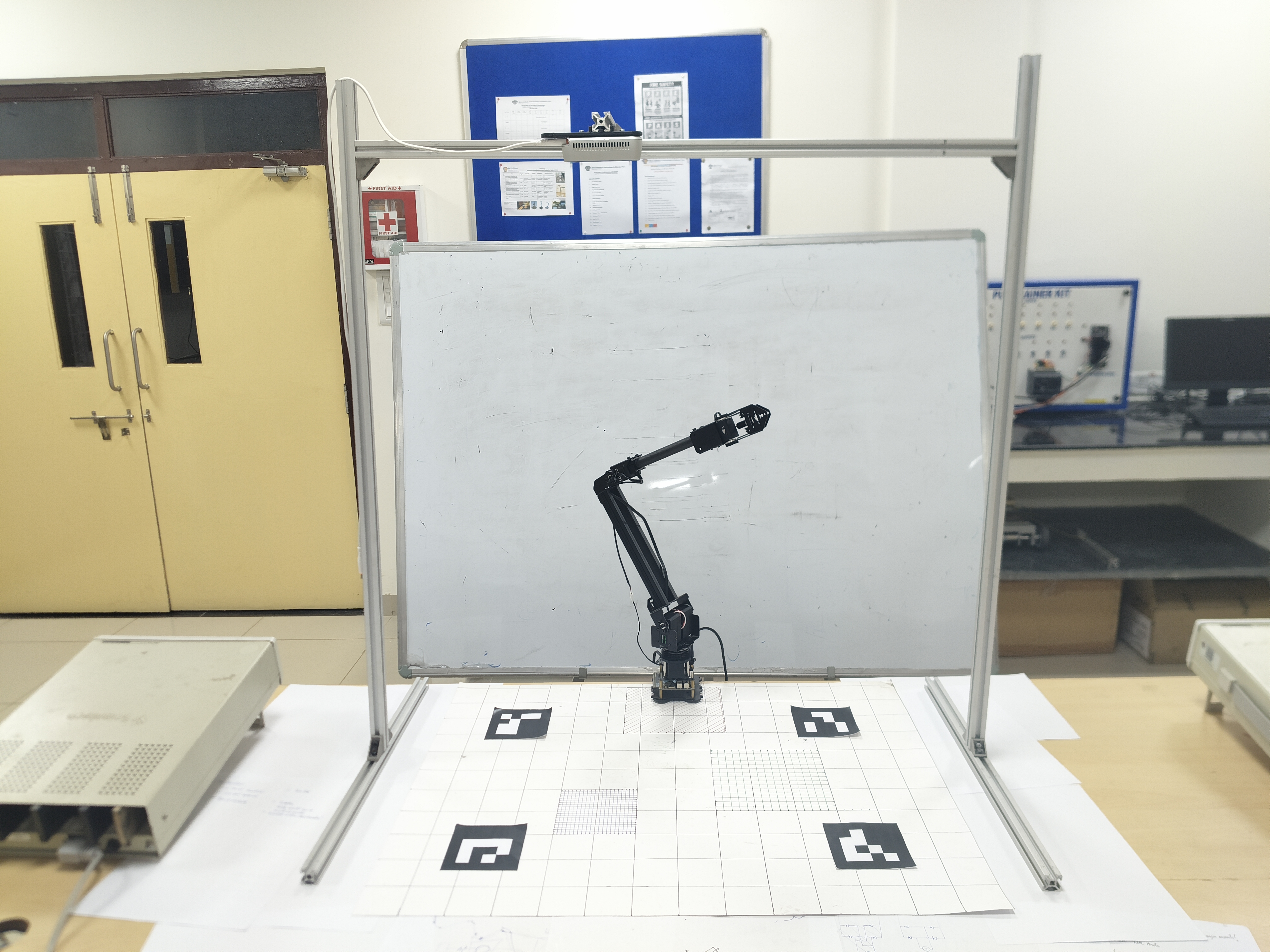
The camera sees pixels; the arm thinks in millimeters relative to its base. Bridging these frames is the calibration step, and it's the single most important part of the system.
Procedure:
- Place four ArUco markers (4x4 dictionary, IDs 0-3) at known positions within the workspace.
- Physically move the arm's end-effector to each marker center and record the arm's reported \((x, y)\) coordinates.
- Move the arm out of frame. Capture a camera image and detect the four marker centers in pixel space.
- Compute a homography \(\mathbf{H}\) mapping pixel coordinates to robot coordinates.
The transform is a standard \(3 \times 3\) projective mapping computed via
cv2.getPerspectiveTransform:
\[ \begin{bmatrix} x_r \\ y_r \\ 1 \end{bmatrix} \sim \mathbf{H} \begin{bmatrix} u \\ v \\ 1 \end{bmatrix} \]
The \(z\)-coordinate in the robot frame is computed separately since the camera is mounted overhead at a known height (~78.5 cm). Combined with the monocular depth estimate and the known table and block heights:
\[ z_{\text{robot}} = z_{\text{camera}} - D + z_{\text{table}} + \frac{h_{\text{block}}}{2} \]
The homography matrix is saved as a .npy file and loaded at runtime.
Every time the camera, arm, or workspace surface moves, recalibration is
required. There's no way around this with a rigid transform approach.
Semantic Parsing: From "Grab the Red One" to
{"action": "pick", "color": "red"}
The system needs to convert free-form text like "grab the red one" or "put it down" into a structured command. There are two ways to do this: call an LLM, or train a small classifier. We decided to go with the latter.
Why Not an LLM?
Latency. An API call to a cloud LLM adds 500ms-2s of round-trip time, every single
command. For a reactive manipulation system, that's unacceptable. More importantly, the
action space is tiny -- there are exactly four output classes:
pick, place, drop, and none. This is
a classification problem, not a generation problem.
The Classifier
The system uses model2vec (potion-base-8M), a static
embedding model
that converts sentences to 256-dim vectors in under a millisecond. On top of that sits a
simple Logistic Regression classifier trained on ~80 hand-written
examples.
| Component | Choice | Rationale |
|---|---|---|
| Embedding | model2vec (8M params) | Sub-millisecond inference, no GPU required |
| Classifier | Logistic Regression | Four classes, <100 training samples -- anything more is overkill |
| Color extraction | Regex | Deterministic, zero ambiguity |
The training data is intentionally diverse in phrasing:
# Subset of training examples
("pick the red block", "pick"),
("grab the blue cube", "pick"),
("fetch the orange block", "pick"),
("place it here", "place"),
("put it down", "place"),
("drop it", "drop"),
("let go", "drop"),
("do a backflip", "none"),    # Out-of-distribution
("what is your battery level", "none"),
Color is extracted separately via regex after classification -- it's not part of the classifier's job. This decoupling means the classifier generalizes to any color without needing color-specific training data.
The classifier outputs a confidence score. In practice, anything above ~70% is reliable.
The none class acts as a catch-all for out-of-distribution inputs --
queries the system can't or shouldn't act on.
The Grounding Layer: A Finite State Machine
Here's the trick. Even a perfect classifier can produce dangerous commands if the system doesn't track its own state. Consider:
- User says "drop it" when the gripper is empty -- the arm would execute a drop sequence on nothing.
- User says "pick the red block" when already holding a block -- the arm would try to grab a second block with a full gripper.
The FSM controller prevents this. It maintains exactly two states:
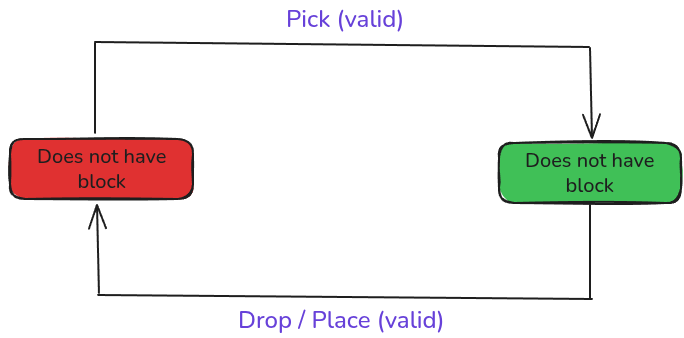
Every action request passes through fsm_controller(action, current_state)
before any motor command is issued. Invalid transitions return a no-op and
the system responds with a human-readable rejection.
def fsm_controller(action_name, current_state):
    state = _normalize_state(current_state)

    if action == "pick":
        if state == "doesnot_have_block":
            result = pick()
            return "have_block", f"pick: {result}"
        else:
            return state, "no-op: already have block"

    if action == "drop":
        if state == "have_block":
            result = drop()
            return "doesnot_have_block", f"drop: {result}"
        else:
            return state, "no-op: no block to drop"
This is the layer where LLM "hallucinations" (or in this case, classifier misclassifications) are caught. The FSM is the only component that can authorize motor movement. The classifier suggests - the FSM decides.
Motion Execution
The arm is controlled over WiFi via JSON commands sent as HTTP GET requests. The controller class wraps this into a clean Python API.
Motion Completion Detection
One non-obvious engineering challenge: how do you know when the arm has finished moving? The arm's firmware acknowledges commands immediately, but the physical motion takes time. Issuing the next command too early causes jerky, unpredictable motion.
I solved this with a polling-based stability detector. The system queries the arm's joint feedback at ~5 Hz and tracks the maximum joint-angle delta between consecutive readings. If the delta stays below a threshold (\(\epsilon = 0.02\) rad) for three consecutive polls, the motion is considered complete.
def wait_for_motion_completion(self, check_interval=0.2, stability_required=3):
    stable_count = 0
    while True:
        current_values = self.get_feedback()
        max_delta = max(abs(v - last[k]) for k, v in current_values.items())

        if max_delta < self.motion_tolerance:
            stable_count += 1
        else:
            stable_count = 0

        if stable_count >= stability_required:
            break
This approach is hardware-agnostic and avoids relying on firmware-specific "motion complete" flags.
Pick Sequence
A pick action executes five steps in sequence, each blocking until completion:
- Open gripper -- Set joint 4 to open angle
- Approach -- Move to \((x, y, z + 10)\) above the target
- Descend -- Lower to grasp height \(z - h_{\text{block}}/2\)
- Close gripper -- Grasp the block
- Return home -- Lift to a safe home position while holding the block
Place and drop follow analogous sequences. All coordinates are in the robot's base frame, transformed from camera pixels via the calibration homography.
User Interface
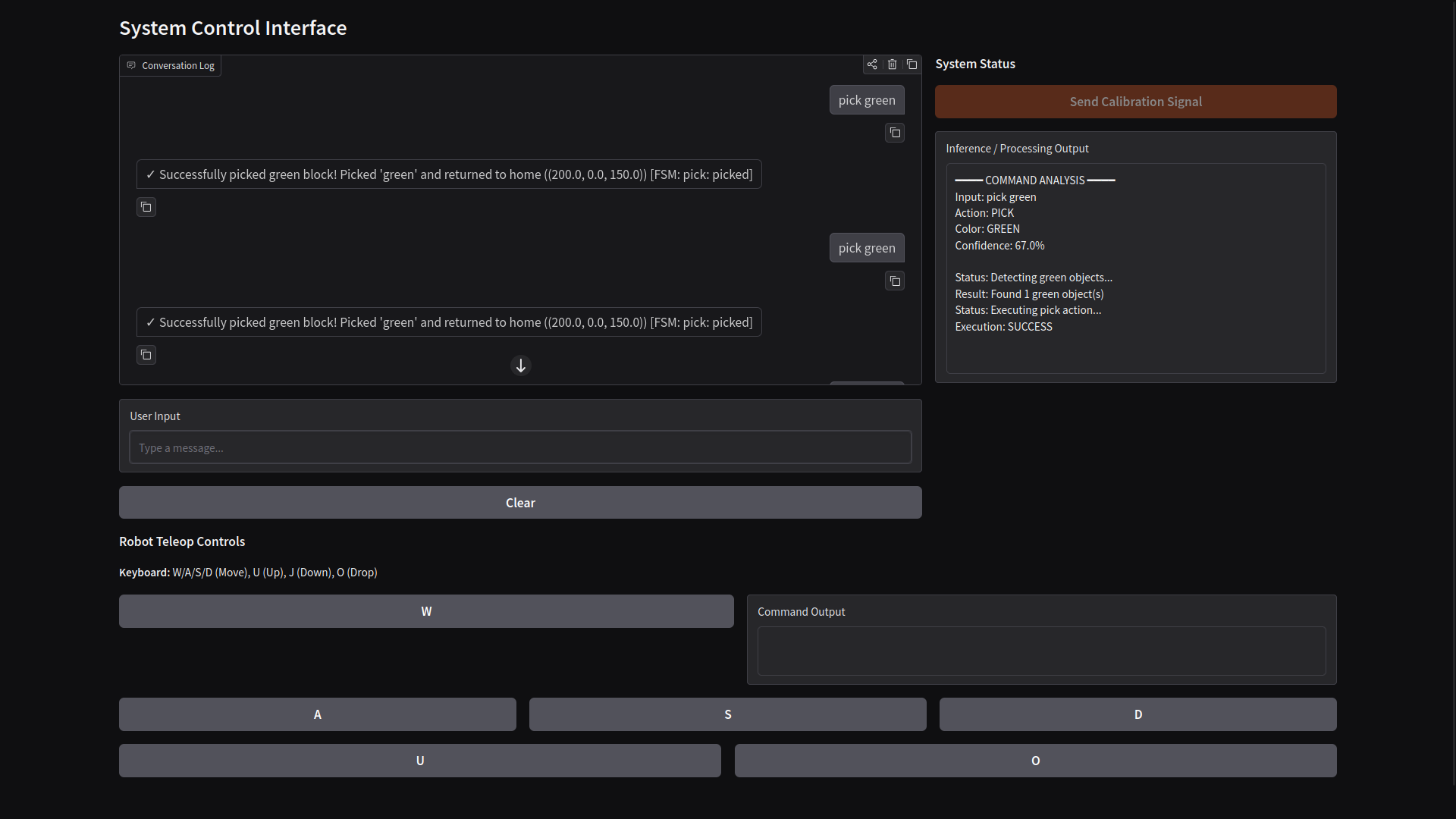
The interface is a Gradio web app with two modes:
- Chat mode -- Type natural language commands. The system classifies, validates, detects objects, and executes.
- Teleop mode -- Direct keyboard control (W/A/S/D for XY, U/J for Z, O for drop). Useful for manual positioning and debugging.
An inference panel shows the classifier's output in real-time: detected action, color, confidence, and execution status.
Results
The system reliably handles the core manipulation loop: detect, pick, place, and drop colored blocks via natural language.
What works well:
- Color segmentation is robust under consistent overhead lighting. Six colors are distinguishable without cross-contamination.
- Calibration holds steady as long as nothing in the physical setup moves. Reprojection accuracy is within ~5 mm.
- The FSM grounding layer has successfully prevented every invalid action during testing. No unsafe motor commands have been issued.
- Classifier latency is negligible -- sub-5ms per command including embedding and classification.
What doesn't work well (yet):
- Lighting sensitivity. The HSV thresholds are tuned for a specific lighting setup. A learned color model would generalize better.
- Single-block grasping only. The system picks one block at a time and has no concept of task planning or sequencing (e.g., "sort all green blocks to the left").
- No occlusion handling. If blocks overlap, the segmentation breaks. Depth-based instance segmentation would help here.
- Calibration is manual. An automatic extrinsic calibration routine (e.g., eye-in-hand with known checkerboard) would reduce setup friction significantly.
Future Work
- Task-level planning. Integrate an LLM for multi-step plan generation ("sort by color" -> sequence of pick-place primitives), while keeping the FSM as the execution gatekeeper.
- Learned visual features. Replace hand-tuned HSV ranges with a lightweight object detection model for better generalization.
- 6-DOF grasping. The current system only reasons about \((x, y, z)\). Adding orientation-aware grasping would handle arbitrarily placed objects.
- Closed-loop visual servoing. Currently the system is open-loop after the initial detection. Continuous visual feedback during approach would improve grasp success rate.
Credits
| Tool / Library | Role in This Project |
|---|---|
| OpenCV | Color segmentation, contour detection, ArUco marker detection, homography computation |
| model2vec | Lightweight sentence embeddings for the text classifier
(potion-base-8M) |
| scikit-learn | Logistic Regression classifier and label encoding |
| Gradio | Web-based chat and teleop interface |
| NumPy | Matrix operations, calibration storage, coordinate math |
| Intel RealSense SDK | Camera intrinsics and RGB frame capture via pyrealsense2 |
| RoArm-M2 | 4-DOF robotic manipulator (hardware) |
| Python | Everything is glued together in Python |
Team: I built this project as part of a team of three. Thanks to my two teammates - szyfrowac and clepenji for the many late-night debugging sessions and calibration reruns.